How SARSTREAM works
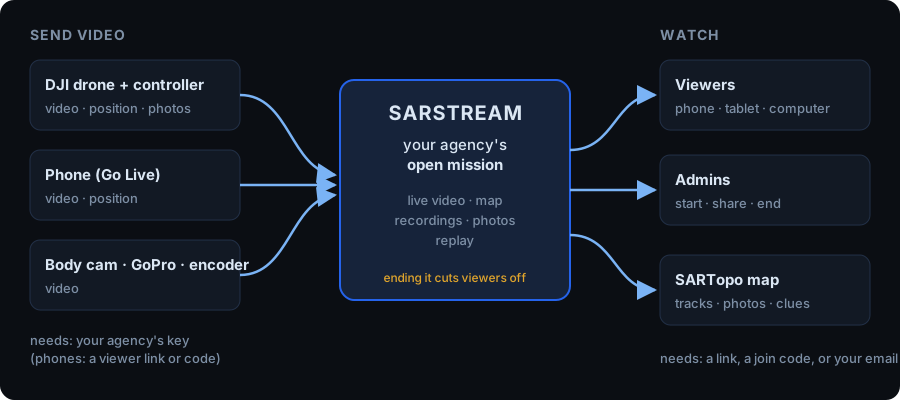
SARSTREAM takes live video from drones, phones and body cams, and shows it to everyone working the search — on any phone, tablet or computer, with the drones on a map. Nothing to install for viewers.
Missions
Everything happens inside a mission — one callout. A mission starts by itself when a drone powers on, a camera starts streaming or a pilot connects (or an admin starts it). A controller that is only switched on doesn't start one. Only an admin ends a mission. It holds the live video, the recordings, the drone tracks and the photos.
When the mission ends, every viewer is cut off and the join codes change. The recordings stay, for replay. See Missions.
Who can send video
- Drones and cameras need your agency's key (a word your admin creates). Whatever streams with your key belongs to your agency — even a visiting pilot's drone.
- Phones go live from the viewer, if an admin allows it. They can join a mission but never start one.
Who can watch
People need one of these, all handed out by your admins:
- the 6-digit viewer code (changes every mission);
- a viewer link (ends with the mission);
- their email on your agency's list (they request a link themselves).
Admins have their own code and links, which also let them end missions and manage keys.
Agencies are separate
Each agency sees only its own missions, video and people. Another agency can help — their pilot flies with your key, or you send them a viewer link — see Sharing & mutual aid.
Recording
While a mission records, video is saved in a few-minute chunks, so replay runs a few minutes behind live. An admin can start a mission not recording for sensitive work: everyone can watch live, nothing is saved.